How to Make an AI Voice Assistant (No Code) for Business & Agencies
Most people who search for how to make an AI voice assistant fall into one of two groups. Either you want one for your own business, something that can answer calls and book appointments on your behalf, or you want to offer them to clients and get paid for it. This guide covers both, and it assumes you cannot write a line of code.
That assumption matters, because the older way of building a voice assistant was a developer project. You stitched together speech recognition, a language model, and a voice engine, then maintained the whole thing yourself. That route still exists, and we will walk through it. But it is no longer the only option, and for most readers it is no longer the smart one.
The voice AI agents market was valued at around USD 2.4 billion in 2024 and is projected to reach USD 47.5 billion by 2034, growing at a compound annual rate near 35 percent. The sections that follow explain what a voice assistant consists of, how to build one without writing code, and, for agencies, how to convert that capability into recurring revenue.
What an AI voice assistant actually is
An AI voice assistant is software that listens to a person speak, determines what they need, and responds in a natural voice. Three components carry out this process, supported by two further elements that connect the assistant to your information and your customers.
Speech Recognition (ASR)
Automatic speech recognition converts spoken words into text the system can read. When a caller says "I need to reschedule my appointment," ASR transcribes that audio into an accurate string of words for the system to interpret.
The Language Model
The language model is the reasoning layer. It interprets the transcribed text, identifies the caller's intent, and determines an appropriate response. Modern assistants run on the same class of models that power tools such as ChatGPT, which is why they handle natural, unscripted phrasing far more effectively than the rigid phone menus they replace.
Text to Speech (TTS)
Text to speech converts the assistant's written response into spoken audio in a voice that sounds human rather than synthetic. The quality of this output has a direct effect on caller experience and on whether a caller stays on the line.
Knowledge Base and Channels
Around these three components sit two further elements. The knowledge base is the information the assistant is permitted to draw on when responding. The channel connection links the assistant to phone lines or messaging platforms so it can receive and place calls. Together, these five elements form a working voice assistant.
What a Good Voice Assistant Can Actually Do
The value of a voice assistant lies not in its components but in the outcomes it produces. A well-built assistant justifies its cost by handling the repetitive, time-sensitive work that occupies staff and constrains capacity. Several core functions illustrate this.
Answering calls around the clock means that an inquiry received outside business hours becomes a captured lead rather than a missed one.
Qualifying leads through the appropriate questions at the outset allows the team to concentrate only on prospects worth pursuing.
Scheduling appointments directly into a calendar removes the need for staff involvement.
Placing follow-up calls re-engages contacts who have not responded.
Transferring to a staff member happens as soon as a request exceeds what the assistant should handle independently.
The application of these functions varies by industry. For a home services company, the assistant might capture the square footage and timeline of a project before any staff member is involved.
For a clinic, it might fill cancellation slots automatically. In each case the principle remains consistent, since the assistant absorbs routine volume so that staff can focus on work that genuinely requires a person.
The Real Decision: Build It Yourself or Use a Platform
Two routes exist, and the right one depends on your resources and goals.
Building It Yourself With Code
A voice assistant can be assembled from individual parts. The process involves selecting a speech-to-text service such as Whisper, connecting it to a language model through an API, adding a text-to-speech engine, and writing the logic that links them together, usually in Python. Many developer tutorials cover this approach.
The advantage is complete control, since you decide every detail and own the result. For a software company with engineers on staff and a need for something genuinely custom, this is the right path. The harder part is everything that comes after the initial build:
Connecting the assistant to live phone numbers and handling concurrent calls takes ongoing technical work.
Keeping latency low enough for conversations to feel natural needs continuous tuning.
Securing customer data to the required standard is a permanent responsibility, not a single task.
Fixing the assistant's behavior when a model update changes how it responds falls to your team.
None of these is a one-time effort. The result is not a finished project but a system that needs steady maintenance, and for most businesses and nearly every agency, the engineering time outweighs the benefit.
Using a No-Code Platform
The alternative is a white label SaaS platform that has already handled the underlying infrastructure and gives you the building blocks through a dashboard. You configure the assistant rather than code it, while the speech recognition, the language model, the voice, the phone connection, and the scaling are managed for you. That leaves you free to focus on what sets your assistant apart, which is the information it holds and the way it behaves.
The route has two clear benefits. The first is speed, since an assistant can be set up and made live within hours rather than weeks. The second is the lack of maintenance, since improvements to the infrastructure and models are inherited automatically. The trade-off is slightly less low-level control, which most use cases will never need.
For anyone who wants a voice assistant to run a business or to sell to clients, and who does not run a software company, the no-code route is the stronger option on nearly every practical measure.
How to Make an AI Voice Assistant With No Code, Step by Step
The exact controls differ between platforms, but the workflow stays consistent. The steps below reference Stammer AI, a platform built for creating and deploying voice and chat agents without code, to keep the examples concrete. The same sequence applies to whichever tool you choose.
Step 1. Define the Use Case First
The most common reason a voice assistant underperforms is that no one settled on what it was for. Decide this before anything else. The assistant might answer inbound support calls, qualify leads, book appointments, or follow up with people who did not convert. Write a sentence or two describing the single job it needs to do well, since a focused assistant that does one thing reliably outperforms a vague one that does five things poorly.
Step 2. Create the Agent and Load Its Knowledge Base
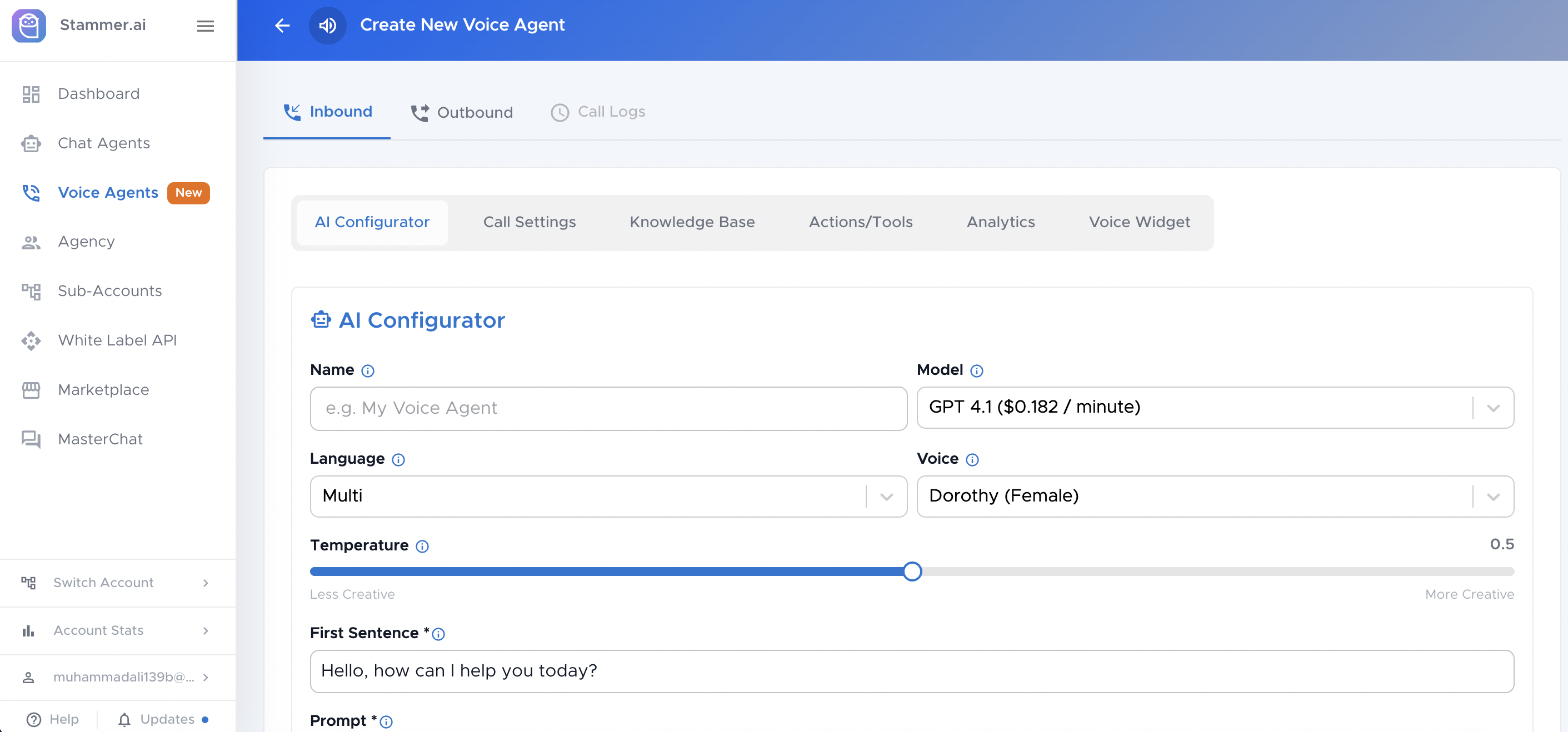
Inside the platform, you create a new voice agent and give it the information it needs to answer questions. This is the knowledge base, and it holds your service details, pricing, hours, policies, and frequently asked questions.
On Stammer, you can paste this content in or upload documents, and the agent draws on it to respond accurately rather than guessing. The quality of this material sets the ceiling on how good the assistant can be, so it is worth preparing carefully.
Step 3. Write the Instructions and Personality
Next you train the agent how to behave, written in plain language as a prompt. You give it a name, describe its role, and set the rules for how it greets callers, what tone it uses, which questions it asks, and when it books an appointment or escalates to a person. The clearer these instructions, the more consistent the agent will be in live conversations.
Step 4. Choose the Voice and the Model
You then select the voice the assistant speaks in and the model that powers its responses. Platforms usually offer several models at different price and quality levels, billed per minute of call time. A lower-cost model handles straightforward call routing well, while a more capable one suits nuanced conversations. Match the choice to the job you defined in the first step.
Step 5. Connect a Phone Number or Channel
For the assistant to take calls, calls need a way to reach it. You connect a phone number, and from there the agent can handle inbound calls or place outbound ones for follow-ups and reminders. Many platforms also let the same agent work across messaging channels, so the logic you built once can serve more than one point of contact.
Step 6. Test Before Going Live
Call the assistant yourself. Work through the straightforward paths first, then try to break it. Ask it something slightly outside its script, interrupt it mid-sentence, and give it a vague request. You are checking two things, whether it stays accurate and whether it hands off gracefully when it should. Close the gaps in the knowledge base and instructions, then test again. This step is what turns a passable assistant into a dependable one.
Step 7. Deploy and monitor
Once it holds up under testing, put it live and review how real conversations unfold. The first weeks of genuine calls reveal more than any amount of internal testing. Note where the assistant stumbles, refine the instructions, and expand the knowledge base as you learn what callers actually ask.
For Agencies: Turning This Into Recurring Revenue
For an agency, a voice assistant represents more than a single deliverable. It is a product line capable of generating ongoing income, and the no-code, white-label model is what makes that possible without an engineering team. Understanding how the economics work is worth the time, because it is the difference between selling a one-off project and building a recurring revenue base.
The foundation of the model is white labeling. The platform that powers the assistant remains entirely out of sight, while the product is deployed under your own domain with your own logo and colors. Clients see your brand throughout and reasonably assume the underlying technology is yours.
That positioning carries real commercial weight, since it allows the agency to present itself as an AI specialist and to price its services on that basis rather than competing on production cost alone. On a platform such as Stammer, even the dashboard a client logs into can carry your branding instead of the vendor's, which keeps the impression consistent at every touchpoint.
Once the assistant is built and branded, the revenue model typically rests on three layers that work together over the life of the engagement.
A one-time setup fee covers the work of building, configuring, and launching the agent for the client, and reflects the value of a system tailored to their business.
A recurring monthly subscription keeps the agent running and supported, commonly priced in the range of a few hundred dollars per client, which forms the predictable base of the income.
A markup on usage adds margin on the call minutes the agent consumes, so the client is billed above your underlying cost and the agency retains the difference as the agent is used.
Taken together and repeated across a client base, these three layers convert a single build into dependable recurring income rather than an isolated project fee. The model holds together because the platform absorbs the technical burden that once demanded a development team.
The agency's contribution becomes understanding each client's needs, configuring an effective agent, and managing the relationship over time, all of which sit comfortably within an agency's existing strengths. In practical terms, you are extending a skill set you already possess into a high-margin service, without taking on the cost and complexity of becoming a software company.
Frequently asked questions
Can I make an AI voice assistant without coding?
Yes. No-code platforms handle the technical infrastructure and let you build an assistant by configuring it through a dashboard, choosing a voice, loading a knowledge base, and writing plain-language instructions. No programming is required.
How much does it cost to make an AI voice assistant?
With a no-code platform, cost usually breaks into a monthly platform subscription plus usage, where voice calls are billed per minute based on the model you choose. Building from scratch with code has no subscription but carries significant development and ongoing maintenance costs, which for most users end up higher.
Do I need an API key to build one?
On most no-code platforms, no. The platform manages the connections to the underlying models for you. Some platforms let you bring your own API key if you prefer to manage usage costs directly, but it is optional rather than required.
How long does it take to build one?
A focused voice assistant can be built and tested in a few hours on a no-code platform once you have your knowledge base and instructions ready. The coding route typically takes far longer and adds maintenance time indefinitely.
Can I sell AI voice assistants to my clients?
Yes. White-label platforms are built for exactly this. You deploy assistants under your own brand and charge clients through setup fees, monthly subscriptions, and usage markups, keeping the margin between your cost and your price.
Getting started
Whether the goal is a voice assistant to answer a company's own calls or one to sell as a service, the approach is the same and it no longer depends on a development team. The essentials are to define what the assistant is for, give it accurate information and clear instructions, connect it to a phone number, and test it until it performs reliably.
For a business, the result is a consistent first point of contact that captures every inquiry. For an agency, it is a high-margin product that can be built quickly and billed on a recurring basis.
The most direct way to understand how the process works is to build an assistant and observe it in practice. Most no-code platforms, including Stammer AI, offer a free trial, which allows you to set up a working voice agent and run test calls before committing to anything further.